 Beckonbird Chat Button
Eight channels, one button
WhatsApp, phone, SMS, Telegram, Viber, Messenger, email or a link of your own. Several open a small menu.
Free WordPress plugin · Pro adds a team and opening hours
WhatsApp, phone, SMS, Telegram, Viber, Messenger or email in one floating button, made of plain HTML and CSS, so it is still there when a speed plugin delays your scripts.
A person reviews every plugin before WordPress.org lists it, so searching your admin will not find this one today. What happens next →
Illustration · sample site
How it works
Paste a number the way you write it.
Side, size and colour, and the pages it shows on.
One channel is a button; more are a menu.
Free, and complete
Most visitors will not fill in a form. They tap, and a chat opens where they already are. All of this is free.
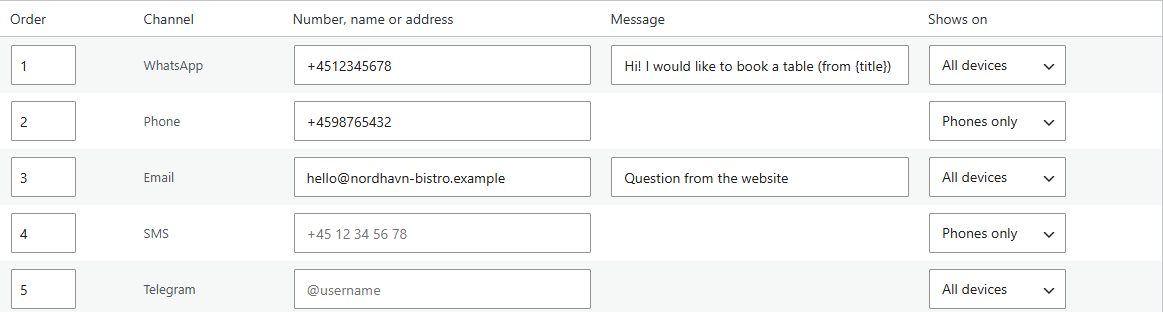
WhatsApp, phone, SMS, Telegram, Viber, Messenger, email or a link of your own. Several open a small menu.
Spaces, dashes, 00 in front or a pasted wa.me link all become the right address. A number that cannot work is refused.
Phone and SMS show on phones only, because a computer cannot call. Each channel can be changed.
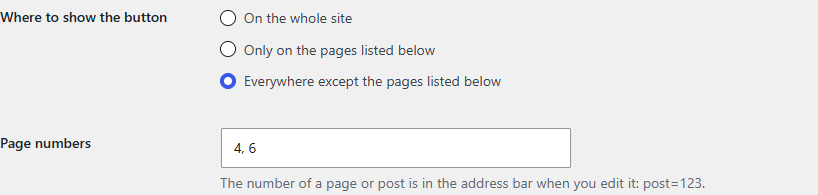
The whole site, only pages you list, or all but the pages you list.
The Buttons tab offers to copy a WhatsApp number and message saved by two common chat plugins. It changes nothing in them.
Delete the plugin and its settings go with it. A visitor downloads one small stylesheet, nothing else.
The real thing
Write {title}, {url} or {site} in the message and it is filled in for the page the visitor is on.
Filled in per page
Phone and SMS: phones only
Keep the button off a checkout or a landing page by writing its number down once.
 All but a few pages
Their numbers
All but a few pages
Their numbers
Why it keeps working
<a href> in the page itself.<details>.Beckonbird Pro
A separate add-on for the button you already have.
One site per licence · plus VAT where applicable · thirty-day refund · What stops if you stop paying
Illustration · what a team looks like
Pro, the real thing
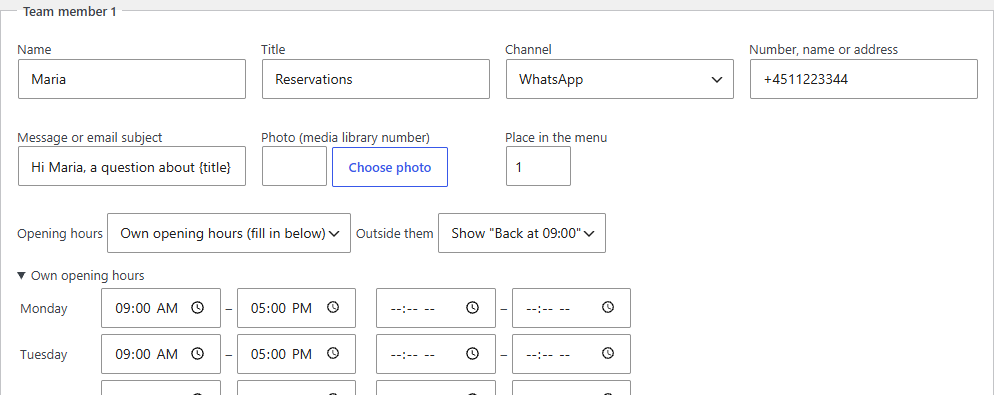
Give a person a channel, a message and opening hours of their own. Outside them they are hidden, or the menu says when they are back.
 Or hide the person
Her own hours
Or hide the person
Her own hours
Compare
| Free | Pro | |
|---|---|---|
| Eight channels in one floating button | ✓ | ✓ |
| Numbers and addresses accepted the way you write them | ✓ | ✓ |
| Whole site, chosen pages, or all but chosen pages | ✓ | ✓ |
| Optional click event for Google Analytics | ✓ | ✓ |
| A team of up to 20 people | — | ✓ |
| Opening hours, for the button and for each person | — | ✓ |
| Click counts per channel, person and page | — | ✓ |
| Updates and email support | — | ✓ |
| $0 | — |
FAQ
Complete. All eight channels, the menu, appearance and where it shows are free, and nothing is switched off without Pro.
One small stylesheet, and only on pages where the button is drawn. No script of its own, and no request to another site.
A computer cannot place a call or send a text, so both start as phones only. Each channel has its own choice.
The team, opening hours and click counts keep working and nothing disappears. What ends is updates and support. The full list is on the pricing page.
The free plugin makes no outbound requests. Pro checks its licence about weekly, and for updates at most twice a day. Written out in full here.
Not in the directory yet, so searching your admin for the name will not find it today. Why, and what happens next →
Plugins → Add New, search for Beckonbird Chat Button, install, activate. Fill in a channel and open your site.